

DESCRIPTION: HOW TO SELL FIXED ASSET AS STOCK IN A2000 ERP?
- if we GRN Fixed assets, can we issue CE as customer suddenly want this fixed assets?
- we got stock item send to UK for refurbishment and recondition, how a2000 system can capture this?
ANSWER TO #1:
SCENARIO 1 – we use sample of asset ‘computer’, in this scenario.
Selling a Fixed Asset as a Stock Item
1.DERECOGNIZE (DISPOSE) THE ASSET FROM FIXED ASSETS
A fixed asset cannot remain on the balance sheet once you intend to sell it. You must remove it from the Fixed Asset Register through a disposal entry.
Disposal entry will include:
- Original cost of the computer
- Accumulated depreciation up to disposal date
- Net Book Value (NBV)
Accounting entry (journal):
Account | Debit | Credit |
Accumulated Depreciation – Computer | Dr | |
Loss on Disposal of Asset (if NBV > transfer value) OR Gain on Disposal (if NBV < transfer value) | Dr/Cr | |
Fixed Asset – Computer | Cr |
This clears the asset from the Balance Sheet.
2.DETERMINE THE TRANSFER VALUE TO INVENTORY
After disposal from Fixed Assets, you must bring the computer into Inventory at an appropriate value.
Three common approaches (check your accounting policy):
Option A: Transfer at Net Book Value (most common)
- NBV becomes your inventory cost.
- This avoids artificially inflating profit.
Option B: Transfer at Estimated Selling Price minus normal margin
- Matches retail pricing strategy.
Option C: Transfer at Fair Market Value
- Used when selling second-hand equipment at market price.
3.RECORD THE ASSET AS INVENTORY (STOCK)
Once the asset is disposed, you add it into your inventory module as a new stock item.
Use the STOCK TRANSACTION entry screen (IT):
Account | Debit | Credit |
Inventory – Computers | Dr (NBV) | |
Stock Adjustment A/c | Cr |
4.SELL THE ITEM NORMALLY THROUGH SALES /POS MODULE
After it is in Inventory:
✔ It can now be invoiced as a regular sales item
✔ Sales revenue and cost of goods sold (COGS) will be correctly recorded
✔ GST/VAT will be applied correctly
5.TAX & ACCOUNTING CONSIDERATIONS
- GST/VAT output tax applies when selling it as a product.
- You should document the reason for asset disposal → conversion to inventory for sale.
- Maintain an audit trail showing:
- Disposal entry
- Transfer valuation
- New inventory entry
- Sales invoice
Auditors often review this because it involves asset reclassification, which affects depreciation, profit, and GST/VAT.
6. SIMPLE EXAMPLE
- Computer cost: SGD 2,000
- Accumulated depreciation: SGD 1,200
- NBV: SGD 800
Step 1 Dispose from Fixed Asset
- Dr Accumulated Depreciation 1,200
- Dr Gain/Loss on Disposal 800
- Cr Fixed Asset 2,000
Step 2 Bring into Inventory (IT Transaction) – from value of Fixed assets.
- Dr Inventory 800
- Cr Stock adjustment 800
Step 3 Sell item for SGD 1,200
System records:
- Dr Accounts Receivable 1,200
- Cr Sales 1,200
- Dr COGS 800
- Cr Inventory 800
- Profit = 400
7. IN SUMMARY
To sell a fixed asset as stock:
Dispose from Fixed Assets
- Transfer to Inventory at NBV / fair value
- Create stock item in inventory
- Sell via normal sales workflow
- Record VAT/GST correctly
ANSWER TO #2:
Please note when a stock item leaves the warehouse for refurbishment but is not sold, not scrapped, and not consumed, the A2000 ERP must treat it as:
- Still own asset
- Temporarily out of physical warehouse
- Still part of your inventory valuation
- In-transit or at vendor location
- No P&L action in the financials
STEP 1 – CREATE REFURBISHMENT WAREHOUSE [the warehouse location where you send the item for refurbishment].
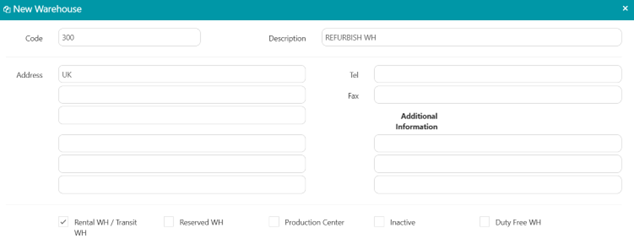
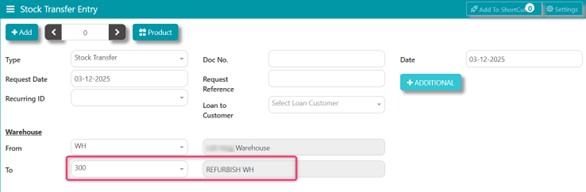
STEP 2 – IM Transaction [transfer the stock item from HQ warehouse to the ‘refurbish warehouse’], assuming value in stock ledger here is at $1,000.
STEP 3 – REVALUE THE REFURBISHED STOCK UPON RETURN TO HQ WAREHOUSE
Assuming the item is $1000 cost, and after refurbishment, the value is $1500.
When the goods are back from UK, do an IT transaction, to take it into HQ WH at $1500. Then issue out from Refurbish WH at $1000, to close the loop.
IT entry [upon IT at revalued $1500]:
- Dr Stock Inventory 1,500.00
- Cr Stock adjustment 1,500.00
IT entry [upon IT at $1000]:
- Dr Stock adjustment 1,000.00
- Cr Stock inventory 1,000.00
***END***

Disclaimer: The information provided here is provided on an as-is basis without warranty of any kind, either expressed or implied, including warranties of merchantability and fitness for a particular purpose. In no events shall A2000 Solutions Pte Ltd or its agents, distributors and suppliers (collectively known as A2000) be liable for any damages whatsoever including direct, indirect, incidental, consequential, loss of business profits or special damages, even if A2000 have been advised of the possibility of such damages. The names of actual companies and products mentioned herein may be the trademarks of their respective owners. All third party trademarks are the property of their respective owners.
Was this article helpful?
That’s Great!
Thank you for your feedback
Sorry! We couldn't be helpful
Thank you for your feedback
Feedback sent
We appreciate your effort and will try to fix the article