A2000 ONLINE SUPPORT DEPARTMENT
KNOWLEDGE BASE


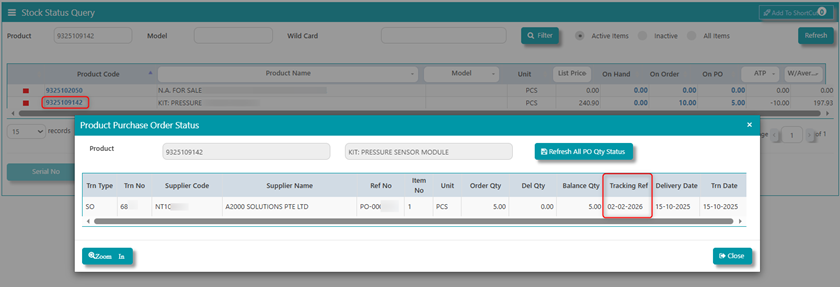
DESCRIPTION: This Documentation will help you know where you can find the Tracking Ref in Product Purchase Order Report of Stock Status Query.
_______________________________________________________________________________________
Problem Statement: Where can we find the Tracking Ref in Product Purchase Order Report of Stock Status Query?
- Click on the transaction in Stock Stus Query, then Zoom In. System will redirect user to the SO transaction. Click on the line detail of the product then choose the ‘I’ button. From here, the system will show additional details where user can find Purchase Order date.
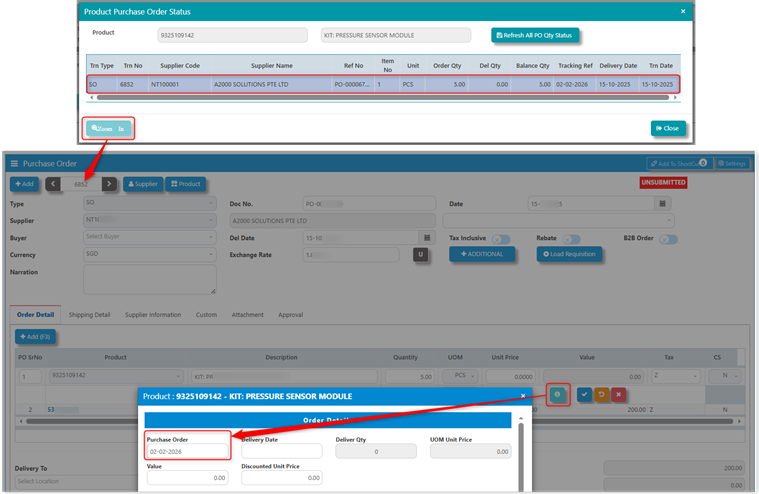
Result:
Simply, the Tracking Ref is the Purchase Order Date of the SO transaction.
*END*
Was this article helpful?
That’s Great!
Thank you for your feedback
Sorry! We couldn't be helpful
Thank you for your feedback
Feedback sent
We appreciate your effort and will try to fix the article