IMPLEMENT BCRS |
- MASTER SETUP
- Company Master
In Company Master, if the COUNTRY = SINGAPORE, there is a new setting called Need BCRS Compliance, as shown. Default Value = False.
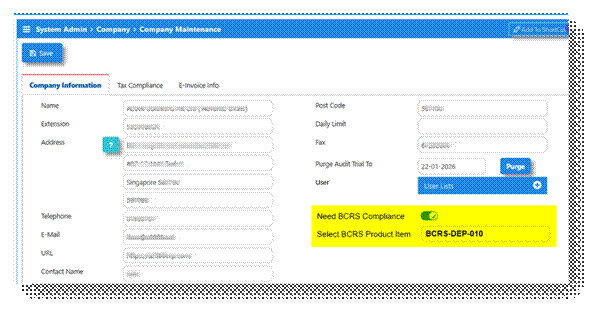
If installed country IS NOT Singapore, to hide this yellow highlighted section.
If Need BCRS Compliance = TRUE, then pop-up a field for selection called Select BCRS Product Item and let the user select item to bill for BCRS Deposit. Note: Item is created under Para 1D below.
- Account Posting Settings
The Sales Account in Account Posting Settings must be set to “By Product Account Group” or “By Customer-Product Account Group” only. This setting is mandatory.
- Create Product Account Group Called “BCRS-DEP”
In this group, set the following:
Type: Service Group
SALES A/C à Map to BCRS Deposit A/c (Current Liability type)
SALES RETURN A/C à Map to BCRS Deposit A/c (Current Liability type)
PURCHASE A/C à Map to Purchase Accrual A/c (Current Liability type)
PURCHASE RTN A/C à Map to Purchase Accrual A/c (Current Liability type)
STOCK A/C à Map to BCRS Deposit A/c (Current Liability type)
This will take care of all transaction postings related to the BCRS Deposits
- Create a Service Product Item to Bill Customers
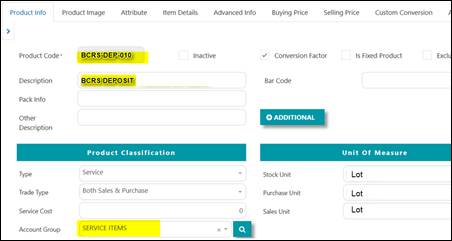
When billing any customer for BCRS Deposit, create the system needs a Service item called BCRS Deposit. Create this item as follow in Product & Service Maintenance:
- BCRS-DEP-010 BCRS DEPOSIT
- For UOM, you may select (or create one) one called LOT
- Go to Finance Info section, and map this item to Product Account Group = BCRS-DEP
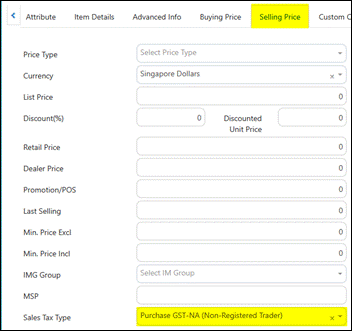
- Default Tax as NA_NR
Based on this Product Account Group setting, whenever an amount is collected under BCRS Deposit, the double entries are:
DR CR
Trade Debtor A/c 100.00
BCRS Deposit A/c 100.00
- Create Sales Product that Attract BCRS DEPOSIT
Under the NEA requirements, any beverage product with containers that needs to recycle would be liable for a BCRS Deposit.
For example, an item called COCA-COLA may be subjected to a BCRS-Deposit of $0.10 while another called XYX BEER CAN may be subjected to a BCRS-Deposit of $0.20.
Example: COCA-COLA
Open up this item in the Product & Service Maintenance:
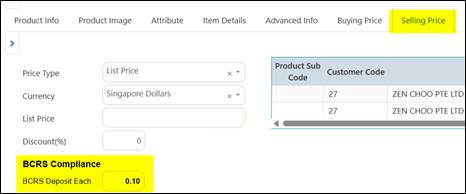
In the Selling Price tab,
- If Country Installed = Singapore, you may see the BCRS Compliance section (below)
- If Country IS NOT Singapore, the BCRS Compliance section is hidden.
- This section is not mandatory – only for products that require BCRS compliance
- Enter the BCRS Deposit Each field with the deposit amount à in this case $0.10
<Add below BCRS Compliance>
BCRS Producer Fee:
Alumimium/Metal  [ S$0.031 ]
Plastic  [ S$0.037 ]
Mixed  [ S$0.068 ]
Important Condition & Remark
- Each product can only check one option.
- Mixed mean contains of 1 Aluminium and 1 Plastic.
- Cost is based on per unit basis, i.e.: Unit/Bottle/Can
- Producer Fee doesn’t require to present in any transaction.
- Producer Fee is only need to present in report.
In the Attribute Tab, go to Optional – Size, user must select SIZE for the item, as it is required for printing out in some invoices to match SIZE to BCRS Deposit rate.
- Stock Conversion Factors
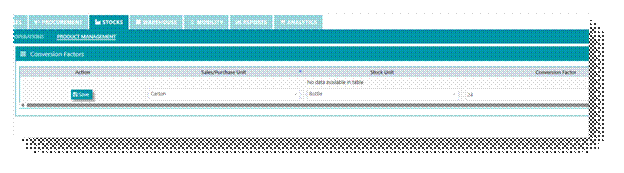
For every product ordered, there are 2 important fields to consider:
STOCK UOM – this should always be the smallest unit where the unit BCRS deposit is applied. For example, if each plastic BOTTLE is charged a deposit of $0.10, then the Stock-UOM should be in BOTTLES.
SALES UOM – this are usually in CARTONs, as it is not likely someone selling beverages to a supermarket sell in loose quantities. Some cartons will have 6 bottles, some 24 bottles.
CONVERSION FACTOR - since a company can buy products using CARTIN or BOTTLES, the Conversion Factor must be entered. For example, the beverage could be purchased in CARTON of 24 BOTTLES, then the Conversion of 1 CARTON = 24 BOTTLES must be entered here:
- BILLING TRANSACTION
- Create CR (Credit Invoice) transaction as usual:
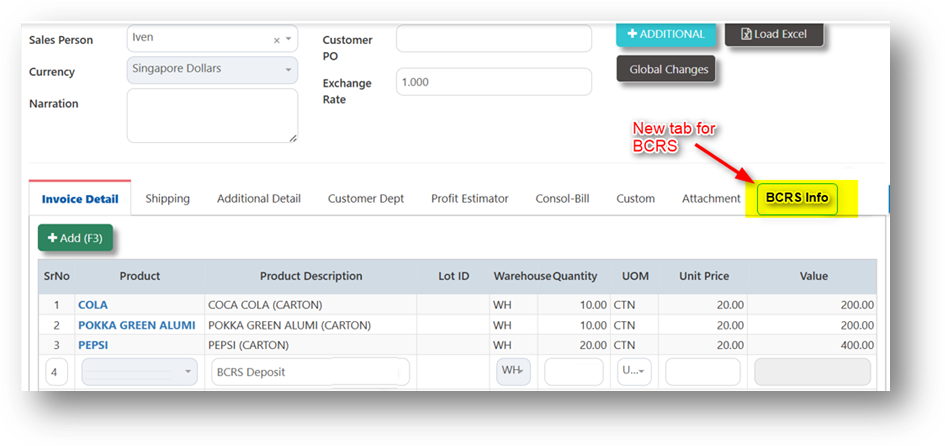
- Click on BCRS Info tab:
The information of the products in the main screen is seen here with the calculations done accordingly.
- QTY is converted to Stock UOM (although the sales is for 10 CARTONS) of 240 BOTTLES
- Deposit Amount is $0.10 / $0.20 / $0.30 as picked from the Product Master
- In this example, BCRS tab now have a BCRS Deposit of $144
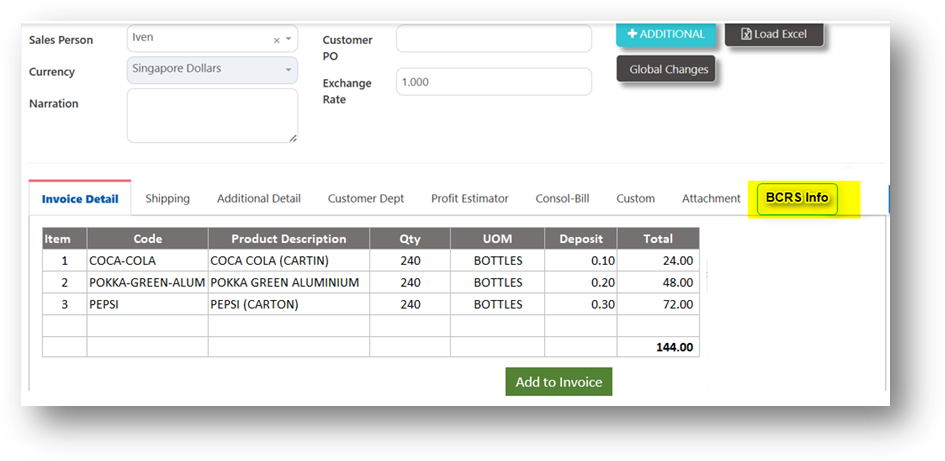
- This screen is READ ONLY and are calculated values – user cannot edit the contents. Once everything is accepted, user can click the button “ADD TO INVOICE”
- BCRS BILLING METHODS
BUTTON: ADD TO INVOICE
Using ‘Add to Invoice’ button: BSCR deposit will be adding to the invoice total. For example in this invoice, the items total $800 – and with the BCRS Deposit, the invoice total is now:
Items 1, 2 and 3 = $ 800.00
GST on 1,2 and 3 @9%) = $ 72.00
BCRS Deposit (No GST) = $ 144.00
TOTAL = $1,016.00
When added to invoice, the system picks up the BCRS-DEPOSIT product defined in Para (1A)
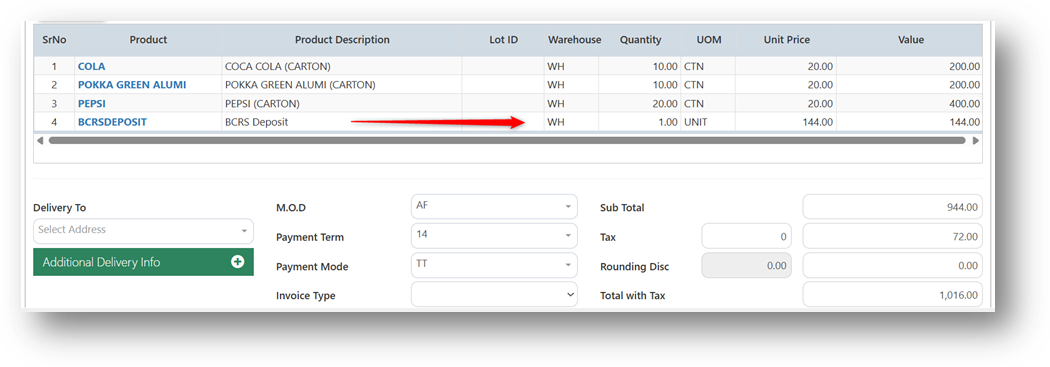
The double entries when the invoice is posted will show:
DR CR
Sales A/c 800.00
Trade Debtor A/c 1016.00
GST Output Tax A/c 72.00
BCRS Deposit A/c 144.00
INVOICE LAYOUTS
For simplicity, we will format only 2 options of invoice format for BCRS.
Layout 1 is our system default format which is already there. Layout-2 is the format prescribed by COLD STORAGE to all their vendors and this is likely the one most of our distribution customers will use.
Layout 1
Note : SIZE comes from Product Master à Attribute Tab à Optional à SIZE field
ORDER PACK is Sales UOM Qty (usually in cartons)
QTY is Stock UOM Qty (usually in BOTTLES or CANS)
In this format the BCRS is treated as a line item which is posted to a Deposit (Liability Account)
|
| SIZE | Order Pack | QTY | UOM | Unit | Total |
1 | Coca Cola | 330 ML | 24 | 10 | CTN | 20.00 | 200.00 |
2 | Pokka Green tea | 330 ML | 24 | 10 | CTN | 20.00 | 200.00 |
3 | Pepsi Cola | 330 ML | 24 | 20 | CTN | 20.00 | 400.00 |
4 | BCRS Deposit |
|
| 1 | LOT | 144.00 | 144.00 |
|
|
|
|
|
|
|
|
|
|
|
|
| Subtotal | 944.00 | |
|
|
|
|
| GST Tax | 72.00 | |
|
|
|
|
| Total | 1016.00 | |
Layout 2 (Cold Storage)
|
| SIZE | Order Pack | QTY | UOM | Unit | BCRS Dep | Total |
1 | Coca Cola | 330 ML | 24 | 10 | CTN | 20.00 | 24.00 | 200.00 |
2 | Pokka Green tea | 330 ML | 24 | 10 | CTN | 20.00 | 48.00 | 200.00 |
3 | Pepsi Cola | 330 ML | 24 | 20 | CTN | 20.00 | 72.00 | 400.00 |
|
|
|
|
|
|
|
|
|
|
|
|
|
|
|
|
|
|
|
|
|
|
|
|
|
|
|
| ORDER SUMMARY |
|
|
|
|
|
|
|
| Total No of Product Ordered = | 3 |
| Subtotal | 800.00 | |||
| Total Product Qty (Cartons) = | 30 |
| GST Tax | 72.00 | |||
| BCRS Deposit = | 144.00 |
| BCRS Deposit | 144.00 | |||
| Total Sales Invoice Amount = | 1,016.00 |
| Total | 1,016.00 | |||
- BCRS PRODUCER FEE REPORTING
BCRS Producer Fee Report
Reporting Period: Apr 2026
Company Name: ABC Beverages Pte Ltd
UEN: 20XXXXXXXA
Prepared Date: 05 May 2026
- BCRS Summary by Material
*Count based on material placed in the market, not “Product Based”.
Material | Units Placed on Market | Fee per Unit (S$) | Total Fee (S$) |
Aluminium / Metal | 120,000 | 0.031 | 3,720.00 |
Plastic | 95,000 | 0.037 | 3,515.00 |
Grand Total | - | - | 7,235.00 |
- BCRS Net Calculation Breakdown
Description | Aluminium Units | Plastic Units |
Opening (Invoices issued) | 125,000 | 98,500 |
Less: Credit Notes / Returns | (5,000) | (3,500) |
Net Units Placed | 120,000 | 95,000 |
- BCRS SKU-level Detail
SKU Code | Description | Material | Units | Fee (S$) |
DRK330A | Cola 330ml Can | Aluminium | 115,000 | 3,565.00 |
DRK500P | Juice 500ml Bottle | Plastic | 90,000 | 3,330.00 |
MIX001 | Energy Drink (Can + Cap) | Mixed | 5,000 | 340.00 |
|
|
| - | 7,235.00 |
I confirm that the above information is accurate and derived from
company sales and return records.
Name:
Designation:
Date:
Was this article helpful?
That’s Great!
Thank you for your feedback
Sorry! We couldn't be helpful
Thank you for your feedback
Feedback sent
We appreciate your effort and will try to fix the article