A2000 ONLINE SUPPORT DEPARTMENT
KNOWLEDGE BASE
1. Navigate to ADMIN PORTAL and provide the login credentials.
Note: These credentials are given by the A2000 Admin to company owners, Account book Administrator only. If you have no credentials yet, kindly contact customer care for assistance.
A. Navigate to the provided link and input necessary credentials.
Encode the Email and Password accordingly and Click Login.
 B. Navigate to Company List and Double Click the Preferred Account book that you want to secure a backup.
  C. Under the Backup TAB Click the Icon Backup Zip Download
 D. Enter the reason for the backup and preferred Password and Click Download button once finished.
Note: The password to be key in will be the same Admin Portal Password used.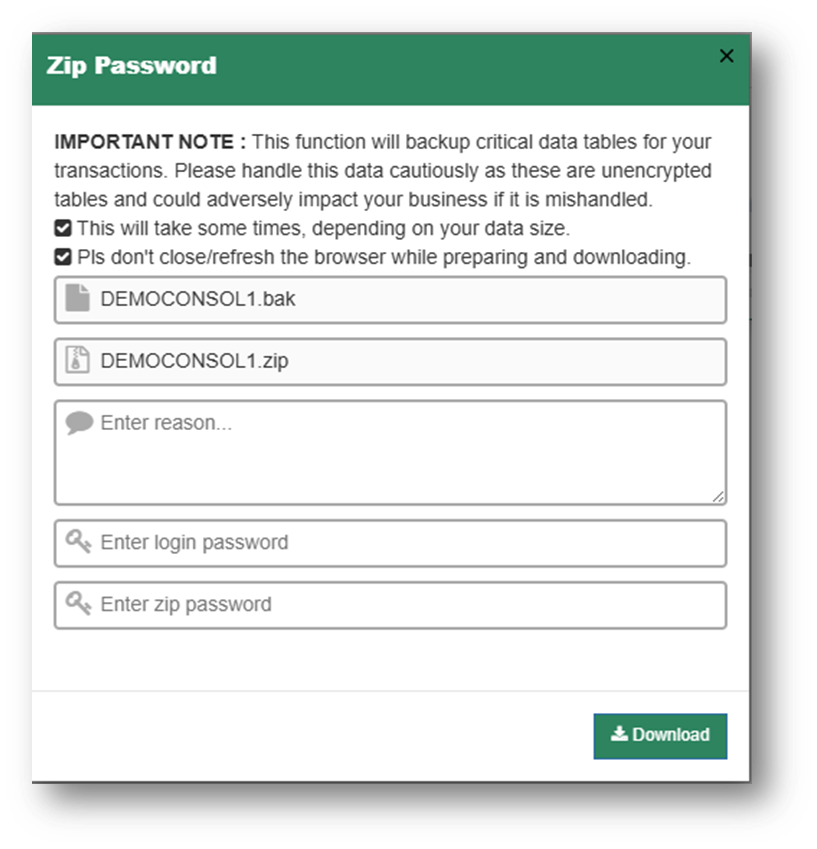
Was this article helpful?
That’s Great!
Thank you for your feedback
Sorry! We couldn't be helpful
Thank you for your feedback
Feedback sent
We appreciate your effort and will try to fix the article